All participants in the Simulation Exercise will receive a username and password for SciSky by email at the start of the game. Not received your email? Contact Jon and he will fix this for you.
Group and or collaborative accounts on SciSky are allowed but are not created by default (e.g. S&D Group or Alliance of Stakeholders) – contact Jon with an explanation of what you want to be created.
Jon is also present on SciSky as @support – you can post him with technical support questions as well.
Table of contents
-
- How to change your avatar
- I see a white screen that says “No candidate paths for action “webfinger”” or some other blank screen
- Can I put images and video on SciSky?
- What apps are there for SciSky?
- How to set email preferences
- New SciSky and Classic SciSky
- What are those three Timelines on New SciSky?
- How to manage follower requests
- How to write Direct Messages
- Favorites and Reposts
- Groups
- Lists
How to change your avatar Top
Due to a small bug with the GNU Social software that powers SciSky this is not as obvious as it should be! Here is how to do it.
1) Use a web browser on a laptop, not on a phone
2) DO NOT click the cog for settings next to your avatar
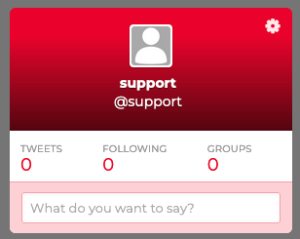
3) Instead go to the menu at the top left of the page, and choose “Classic SciSky”:
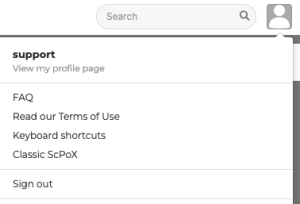
4) When that page opens, click the pencil edit icon next to the avatar. In the screen that appears you can also change other aspects of your profile, and add a biography

5) Once done uploading your new avatar, click “New SciSky” to return to the regular interface

I see a white screen that says “No candidate paths for action “webfinger”” or some other blank screen Top
Sometimes the screen in SciSky goes blank. Either refresh the page, or put a / at the end of the web address (if there is not one already) and hit enter, and the white screen will disappear. Sometimes the white screen will show an error No candidate paths for action “webfinger”
Can I put images and video on SciSky? Top
There is a limit of 24mb per file for uploads. So photos are fine, longer videos are not. Please put your videos on some other platform, and then link them in ScPox.
What apps are there for SciSky? Top
You need to search for “GNU social” or “StatusNet” – what you want is a GNU social/StatusNet app.
Android clients
— Andstatus (http://andstatus.org/) is normally the best bet
has great conversation view as hierarchical tree
Image upload and display of image attachments
oversized notices can be opened via web browser— Mustard{MOD} (Android 3.x – current)
All Mustards support geolocation, upload and display of image attachments, display of oversized notices from instances with larger character limit (open as attachment)— Twidere 2.9.12 (use only this version!)
— Seesmic 1.7.6 (use only this version!) (closed source)
— Zwitscher
— Twydroid (closed source)iPhone clients
— Neustatus, Mayo aka Mayonnaise and Shoyu all seem to have been removed from the Apple App Store – so you will need to use a mobile web browser instead
GNU/Linux clients
— Choqok
— Hotot (use 0.9.7.32, that’s the version that comes with Debian Wheezy)
— Heybuddy
— more: http://federation.skilledtests.com/Statusnet_clients.htmlHow to set email preferences Top
We would ask you to NOT turn on email notifications in SciSky – to limit the server resources used.
New SciSky and Classic SciSky Top
New SciSky uses the default user interface. It is visually very similiar to other well known commercial microblogging services. Its technical name is “Qvitter”. In discussions “Qvitter” and “New SciSky” can mean the same thing, but “Qvitter” mostly refers to the software and “New SciSky” refers to the installation of the Qvitter-software on SciSky.
Classic SciSky is the older GNU social-/StatusNet-interface. At the moment some settings and features (e.g., creating a group) have to be done in Classic SciSky as they are not yet fully implemented in New SciSky.
-
What are those three Timelines on New SciSky? Top
There are three timelines that show differerent notices (depending on the sources):
Timeline (“Home”):
all notices from the people you follow (not just the ones they send to people you happen to follow as well).Public Timeline:
all notices posted by SciSky accounts.The Whole Known Network:
not only all notices of the Public Timeline but also those of all people on other (“remote”) instances of the GNU social-/StatusNet-federation followed by at least one SciSky user – if in doubt use this one!How to manage follower requests Top
This does not matter too much in SciSky as all posts can be seen by all players in “Whole Known Network” anyway, but you can follow and unfollow each other if you wish
How to write Direct Messages Top
Direct Messages are only supported in Classic SciSky at the time of writing (Messages in the left menu).
Your header avatar (upper right) → Classic SciSky → Messages (left column)
Favorites and Repeats/Reposts Top
In all the three timelines you can click on a notice to expand it and see who has favored or repeated it.
Favs and Repeats/Requeets look like this in New SciSky: http://qttr.at/du6 and like this in Classic SciSky: http://qttr.at/du5
Groups Top
Please do not use the Groups function.
Lists Top
Please do not use the Lists function.